
Skip to content
Velyr

Velyr

Your photos. Only yours.

Your private memories deserve a private space.

Velyr gives your personal photos a beautiful, dedicated space designed around privacy, simplicity, and control.

Coming soon on the App Store

How it works
  • Encrypted on your iPhone
  • No account
  • Photos & videos
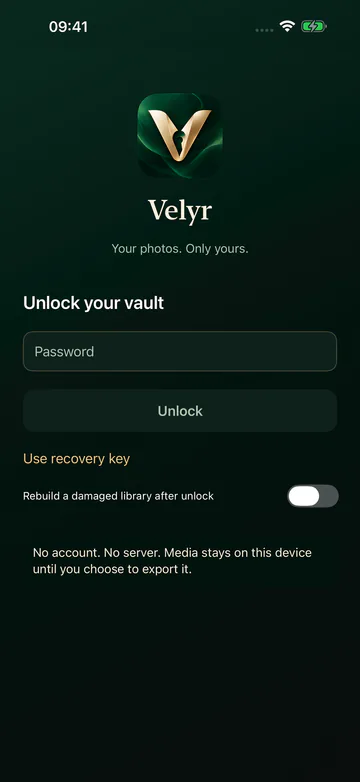
Velyr unlock screen with the Velyr logo, a password field and an Unlock button.

Features

A private space, beautifully kept.

Everything you place in Velyr is encrypted on your iPhone and opens only with your Velyr password.

  • Private Photo Vault

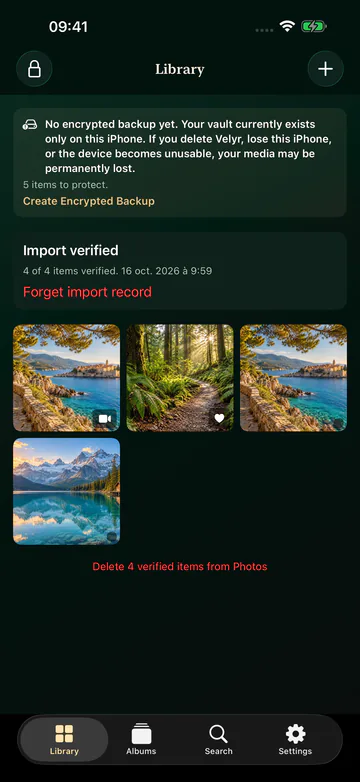
    Import photos and videos from your library into a vault encrypted on your iPhone. View photos and play videos without leaving it.

  • Protected Access

    Unlock with a Velyr password separate from your iPhone passcode. Face ID quick unlock is optional, and a Recovery Key lets you set a new password.

  • Organized Albums

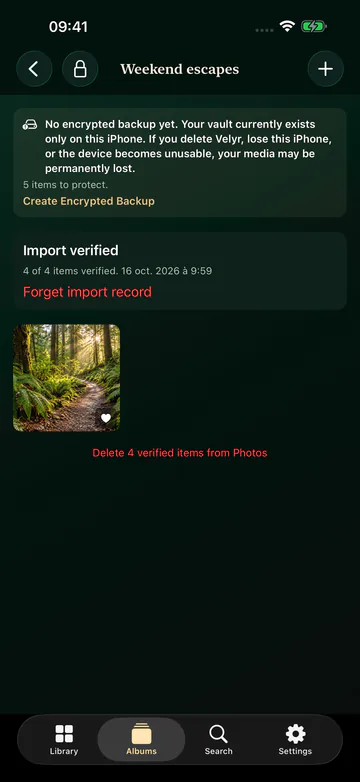
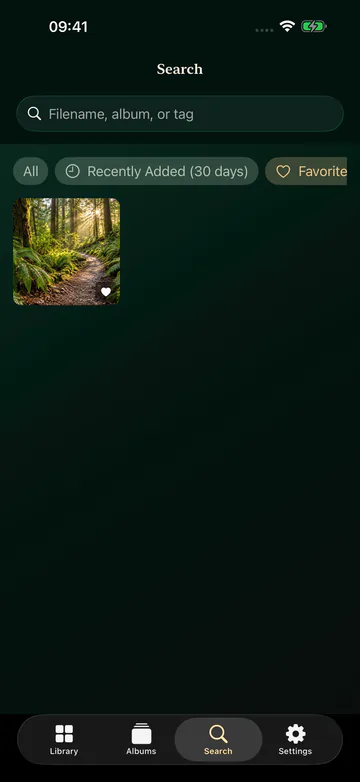
    Create albums, mark favorites and find items with search and filters such as Recently Added, Videos and Screenshots.

  • Encrypted Backups

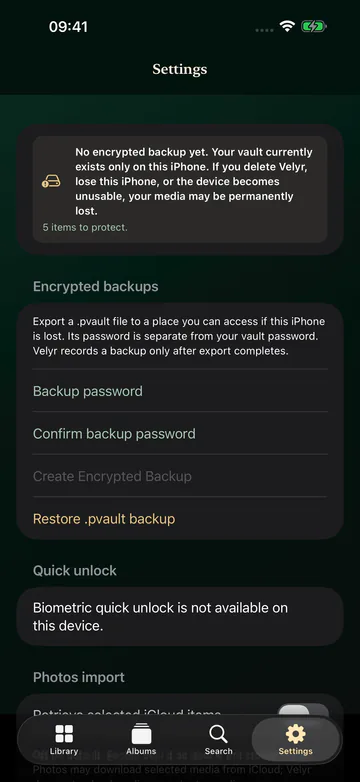
    Create portable .pvault backups protected by their own password, keep them where you choose and restore them in Velyr.

  • Privacy-Focused Design

    No account, no Velyr server, no ads and no analytics. Velyr locks as soon as it leaves the screen.

How it works

Set up. Import. Access privately.

A few minutes to create your vault.

  1. Set Up

    Create a Velyr password of at least 12 characters, then save your Recovery Key somewhere safe, outside your iPhone.

  2. Import

    Choose the photos and videos to protect. Velyr encrypts and verifies each item before it is added to your vault.

  3. Access Privately

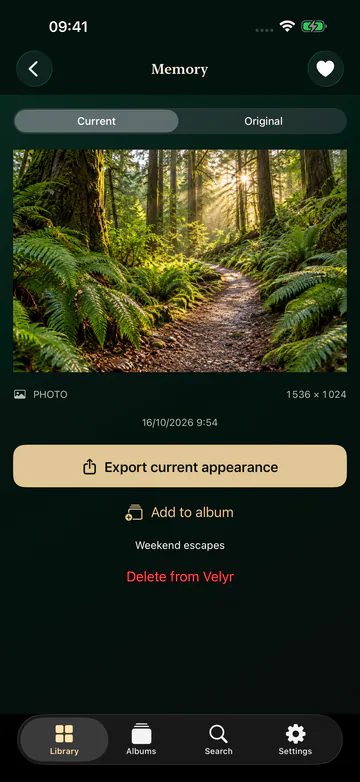
    Unlock with your password or Face ID, browse your albums, and export only what you decide to share.

Screens

Quietly elegant. Entirely yours.

A focused interface in emerald and champagne, designed for calm, private browsing.

Real screens from the current pre-release build, captured with a demonstration vault of public sample images. The interface is in English.

Privacy & security

Privacy, by design.

What Velyr protects, and what it is honest about.

  • Stays on your iPhone

    The vault is stored in the app’s private storage. Nothing is uploaded automatically.

  • Authenticated encryption

    Media, thumbnails and metadata are encrypted with AES-256-GCM. Your password is strengthened with Argon2id.

  • Only you hold the keys

    There is no account and no server: DORIAQ cannot see your vault or reset your password.

  • No ads, no analytics

    Velyr contains no advertising, no tracking and no third-party analytics.

No app can protect against everything: a compromised device, someone watching you unlock, or copies already kept by Photos, iCloud or other apps are outside Velyr’s control. Losing both your password and Recovery Key without a backup makes the vault unrecoverable. Read the full privacy policy.

Download

Velyr

Your photos. Only yours.

Availability
Coming Soon on the App Store
Pricing
  • One-time purchase
  • No subscription
  • No ads
  • No in-app purchases

The price will be shown on the App Store.

Coming soon on the App Store

FAQ

Frequently asked questions

How does Velyr work?

Create a Velyr password and save your Recovery Key, then choose photos and videos from your library. Velyr encrypts each item, verifies it and adds it to your vault. You can then organize items into albums and favorites, and export them when you decide.

Are my photos uploaded anywhere?

No. Velyr has no account and no server. Vault operations happen on your iPhone. If an item you select is stored only in iCloud, Velyr can ask Photos to download it, if you allow it in Settings.

Is the vault included in my iCloud or iPhone backup?

No. The vault’s private storage is excluded from automatic device backups. To protect yourself against losing your iPhone, create an encrypted .pvault backup in Settings and keep it, with its backup password, somewhere outside your iPhone.

What if I forget my password?

Use your Recovery Key to unlock the vault and set a new password. DORIAQ cannot reset your password: without your password, your Recovery Key, a working Face ID quick unlock or a backup you can open, your media cannot be recovered.

Does Velyr delete the originals from Photos?

Never automatically. After an import is fully verified, Velyr can offer to delete the originals, and only does so when you confirm. Apple then keeps them in Recently Deleted, and with iCloud Photos the deletion also applies to your other devices.

Does Velyr support videos?

Yes. Velyr imports and protects photos and videos, and plays videos inside the vault.

How much does Velyr cost?

Velyr is a one-time purchase: no subscription, no ads and no in-app purchases. All features, including exports and backups, are included. The App Store shows the price in your currency.

How do I get help?

Email DORIAQ using the Support section below. Never send your password, your Recovery Key or private photos.

Support

Velyr Support

A question, a problem or a suggestion? The DORIAQ team answers Velyr support requests by email.

Contact Support

Email: contact@doriaq.com

Requests are handled by DORIAQ, the publisher of Velyr.

Helpful details to include

  • Your iPhone model and iOS version
  • The Velyr version (shown in the App Store)
  • What you were doing and the message displayed
  • Never your password, Recovery Key, backup password or private photos

Troubleshooting

I forgot my Velyr password
On the unlock screen, choose Use recovery key, then set a new password. DORIAQ has no copy of your password or Recovery Key and cannot reset them.
Face ID no longer works
Quick unlock stops working if your enrolled faces change. Unlock with your password, then turn quick unlock on again in Settings.
An item failed to import
If the original is only in iCloud, enable Retrieve selected iCloud items in Settings or download it in Photos first, then resume the import. Pending items stay in Photos.
Velyr asks me to unlock again
This is expected: Velyr locks as soon as it becomes inactive, for example when a system dialog or another app appears.
Restoring a backup
Choose Restore .pvault backup in Settings and enter that backup’s password. Your vault Recovery Key does not open a backup.
Moving to a new iPhone
Create an encrypted backup on the old iPhone, copy the .pvault file to a location you can reach, then restore it in Velyr on the new device.

More answers in the FAQ.

Privacy Policy

Velyr Privacy Policy

This privacy policy explains how the Velyr app for iPhone handles your information.

Last updated:

Who publishes Velyr

Velyr is published by DORIAQ, a French simplified joint-stock company (SASU), registered under number 130 190 663 RCS Béziers. DORIAQ is responsible for the processing described in this policy where it decides how personal data is used.

For any question about this policy or your personal data, email contact@doriaq.com. Company information is available in the DORIAQ legal notice.

In short

Velyr is a local, encrypted vault. It has no account, no Velyr server, no advertising, no tracking and no analytics. DORIAQ does not collect or receive any data from the app, including your photos, videos, passwords or usage.

Photos and videos you import

Velyr uses Apple’s Photos framework to import only the items you select. If you enable it in Settings, Photos may download selected items stored in iCloud so they can be imported.

Imported items, their thumbnails and their metadata, including any location information contained in the original files, are encrypted and stored in the app’s private storage on your iPhone. They are never sent to DORIAQ.

During import or export, iOS may require short-lived temporary files. Velyr removes them when the operation ends, when the vault locks and at the next launch.

Passwords, Recovery Key and Face ID

Your Velyr password and Recovery Key are never sent anywhere and are not stored in plain text. Optional Face ID quick unlock is handled by iOS: Velyr never receives your biometric data.

DORIAQ cannot access your vault, recover your password or reset your Recovery Key.

Exports, sharing and backups

Exporting or sharing an item creates a readable copy that you send to the destination you choose. Original exports keep the original metadata, including location. Once copied to another app, Photos or Files, that copy is handled by its destination.

Encrypted .pvault backups are created only when you ask, protected by a separate backup password, and saved where you choose. If that location is a cloud service, its provider stores the encrypted file under its own terms.

Velyr can delete originals from Photos only after you confirm. Apple then keeps them in Recently Deleted, and with iCloud Photos the deletion also applies to your other devices.

Who receives data

Nobody receives data from Velyr unless you export, share or save a backup yourself. DORIAQ does not sell personal data. Apple distributes the app and processes your App Store purchase under its own privacy policy; Velyr itself contains no in-app purchase.

Retention and deletion

Your vault stays on your iPhone until you delete items or delete the app. The vault is excluded from automatic device backups, so deleting Velyr, resetting or losing your iPhone permanently deletes the local vault. Only encrypted backups you have saved yourself remain, wherever you stored them.

Your choices

You can change or revoke photo access in iOS Settings, enable or disable Face ID quick unlock and iCloud retrieval in Velyr, delete items from the vault, and delete the app at any time.

This web page and support emails

This page is part of the DORIAQ website, hosted by Vercel. The website sets no cookies, its code uses no browser storage and it includes no advertising trackers; DORIAQ’s institutional pages use Vercel Web Analytics for aggregated, cookieless audience statistics, which this application page does not load. Hosting technical logs and support emails are described in the DORIAQ website privacy policy.

If you email contact@doriaq.com, DORIAQ receives your email address, your message and anything you choose to attach. It is used only to answer you and to follow up on your request. Please do not send photos or personal information that your request does not require.

Your rights

Because DORIAQ has no access to your vault and receives no data from Velyr, it cannot view, export or delete your vault content for you. You keep full control of it in the app.

Under the applicable conditions, including the EU General Data Protection Regulation, you can request access, rectification, erasure or restriction of your personal data, object to its processing and request portability. Email DORIAQ to exercise these rights. Requests are normally answered within one month.

You can also lodge a complaint with your data protection authority. In France, this is the CNIL.

Children

Velyr is not designed specifically for children and DORIAQ does not knowingly collect personal data from children.

Changes to this policy

This policy describes the current version of the app. If a future version handles data differently, this page will be updated before that version is distributed, and the date below will change.

Contact

Questions about Velyr or this policy: contact@doriaq.com.